
Today, I thought I would show you an easy way of how you can make your own blog button like mine above.
Blog buttons are a great way of getting your blog 'out there'. By putting a blog button with a grab box on your sidebar, its easy for anyone who likes your blog to put your button on their site or in the case of button swaps it just makes it so much easier!
1. Firstly you need to make a blog button. This can be your blog header resized or you can make one from scratch. If your making one I recommend using picmonkey which is free and easy to use!
I would say a decent sized blog button is around 200px x 150px or anything similar (it really depends on what looks best for your button and blog sidebar.
2. Once you have a button, you need to upload it to a site such as photobucket.
3. Going back to your blog, you need to add the following code into the add html gadget via the layout section of blogger (see below).
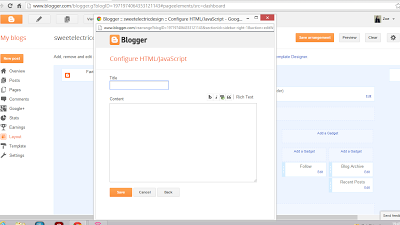
4. Add the following code into the html box - Edit: Now updated as the previous coding stopped working!
<div align="center" style="padding: 5px;"><img src="http://i1225.photobucket.com/albums/ee383/styleinmotion8/bannerbutton_zpsa631da71.png" title="sweet electric" alt="sweet electric" /></div><textarea style="background:#f0f0f0;border:solid 1px #cccccc; color: #777777; font-size:100%; height: 50px; margin:auto; text-align: left; padding: 2px 0 2px 5px; display: block; width: 90%;"><div align="center"><a href="http://www.sweetelectricblog.com" title="sweet electric"><img src="http://i1225.photobucket.com/albums/ee383/styleinmotion8/bannerbutton_zpsa631da71.png" alt="sweet electric" style="border:none;" /></a></div></textarea>
5. In the pink section you need to delete the text and type the link for your blog homepage, for example mine is http://www.sweetelecricblog.com
In the yellow section delete blog name and type in the name of your blog
In the green section you need to delete the text and type in the link to your blog button - if you're using photobucket you need to copy and past the direct link code.
6. Click save and voila!Your blog button and grab box will now be visible on your blog!
*The code will also centre your button in your blog sidebar*


Thank you for doing this! I've bookmarked it, I shall come back to it when I want to make a blog button! x
ReplyDeletethanks katy x
ReplyDeleteJust followed this! Thank you so much!!
ReplyDeleteabundanceoferica.blogspot.ca
no problem erica x
Deletethis was really useful I've just made a blog button using your tips, thanks very much!
ReplyDeletefound your blog through the bbloggers blog hop and am following you :) xx
thanks natalie x
Deletei need to make myself a blog button when i have the time, thanks for the tutorial - you make it look so easy!
ReplyDeletehttp://cloudsandcuticleoil.blogspot.co.uk/
xx
thanks natasha x
DeleteThis is such a helpful post! I got my button through my blog design... but you see so many people asking on Twitter for help making them! xx
ReplyDeletethanks gemma x
DeleteThanks for sharing the tip! I'm sure it's going to be helpful.
ReplyDeleteHeidi’s Wanderings
thanks heidi x
DeleteHi thanks so much for your help! I've just uploaded my own buttons. I was just wondering if you knew why I had a "/> and a empty text box come up underneath each button? Not sure where I have gone wrong!
ReplyDeleteThanks
Sara x
hmm I'm not sure off the top of my head but if you email me I will do my best to sort it out for you :)
Deletehi thanks so much for this post it really helped me i was just wondering how you learnt HTML and CSS?
ReplyDeletethanks again
smozzy
xxx
http://youonlyliveonceenjoyit.blogspot.co.uk/
I taught myself using google and a lot of trial and error haha. I have another blog I practice on xx
Deletecool, well youre good at it :) xxx
Delete